Android · Bluetooth HID · Free & open source
Steer your AI coding agent from the phone in your hand.
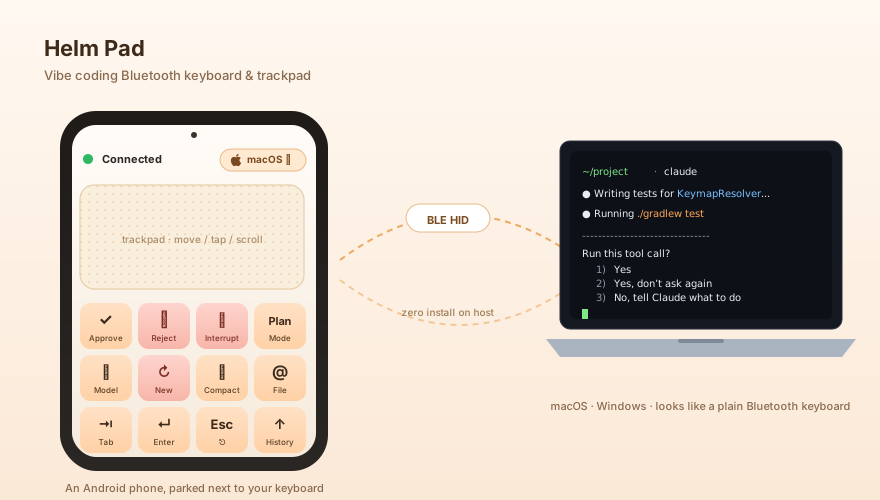
Turn an Android phone or pad into a small Bluetooth keyboard and trackpad that sits next to your laptop — so you can keep nudging an AI agent without leaving your seat, or your coffee.
Works out of the box with Claude Code, Codex, and Cursor — Claude & Codex cover both CLI and desktop; Cursor is tuned for the desktop chat.
Download from Releases View source on GitHub
Android 9+ · Mac or Windows · sideload APK (unsigned-source prompt is expected)
What it does
To the laptop it just looks like a regular Bluetooth keyboard and mouse — no companion app, no driver, no permissions dance. On the phone:
-
Eight macros, two rows — one layout per agent
Approve · Esc · Cycle mode · ↑ and Switch model · New session · Compact · ↓ for Claude Code. Pick Codex in Settings to keep the same geometry with Codex's slash commands (Shift+Tab ·
/model·/new·/compact); both thecodexCLI and the Codex app react the same way. Cursor's profile is tuned for Cursor desktop chat / agent mode using the default VS Code shortcuts (⇧⌘P,⌘I,⌘L,⌘K) — thecursor-agentCLI shares the profile but some buttons may behave differently. -
The rest of the screen is a real trackpad
Single-finger move and tap, two-finger scroll, two-finger tap for right-click, long-press to drag.
-
Auto-detects Mac vs Windows
Picks the matching modifier key (Cmd vs Ctrl), so the same phone works on either machine without you thinking about it.
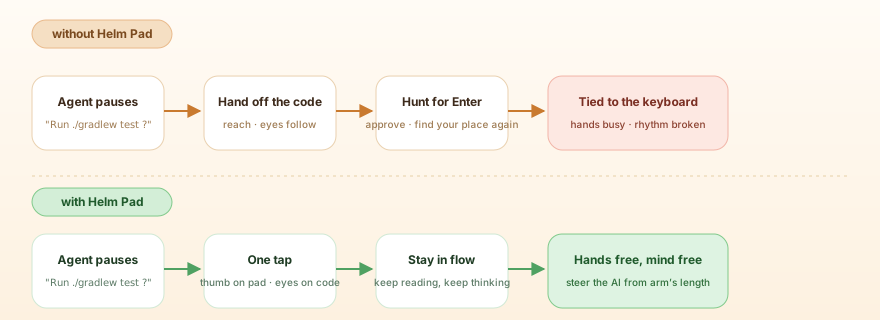
The use I keep coming back to: agent is running, I'm leaning back with the phone in one hand and a coffee in the other. It pauses for input, I thumb Approve, leaning stays leaning. The break stays a break.
Trying it
You'll need an Android 9+ phone and a Mac or Windows machine.
-
Grab the APK and install it
Download the latest signed APK and open it on your phone. Android will show an Install from unknown source prompt — that's expected for sideloaded apps. There is no Play Store listing.
-
Pair from your laptop
From the laptop's Bluetooth settings, pair the phone like any other keyboard. No driver, no companion app on the laptop side.
-
Open Helm Pad once
Follow the on-screen setup. Done — start nudging.